darkSynced16 ANSI colors
Adwaita Dark for Ghostty
Adwaita Dark is a dark Ghostty theme. Set theme = Adwaita Dark in your Ghostty config to use its 16 ANSI colors, #1c1c1f background, and #ffffff text.
Preview
Terminal preview
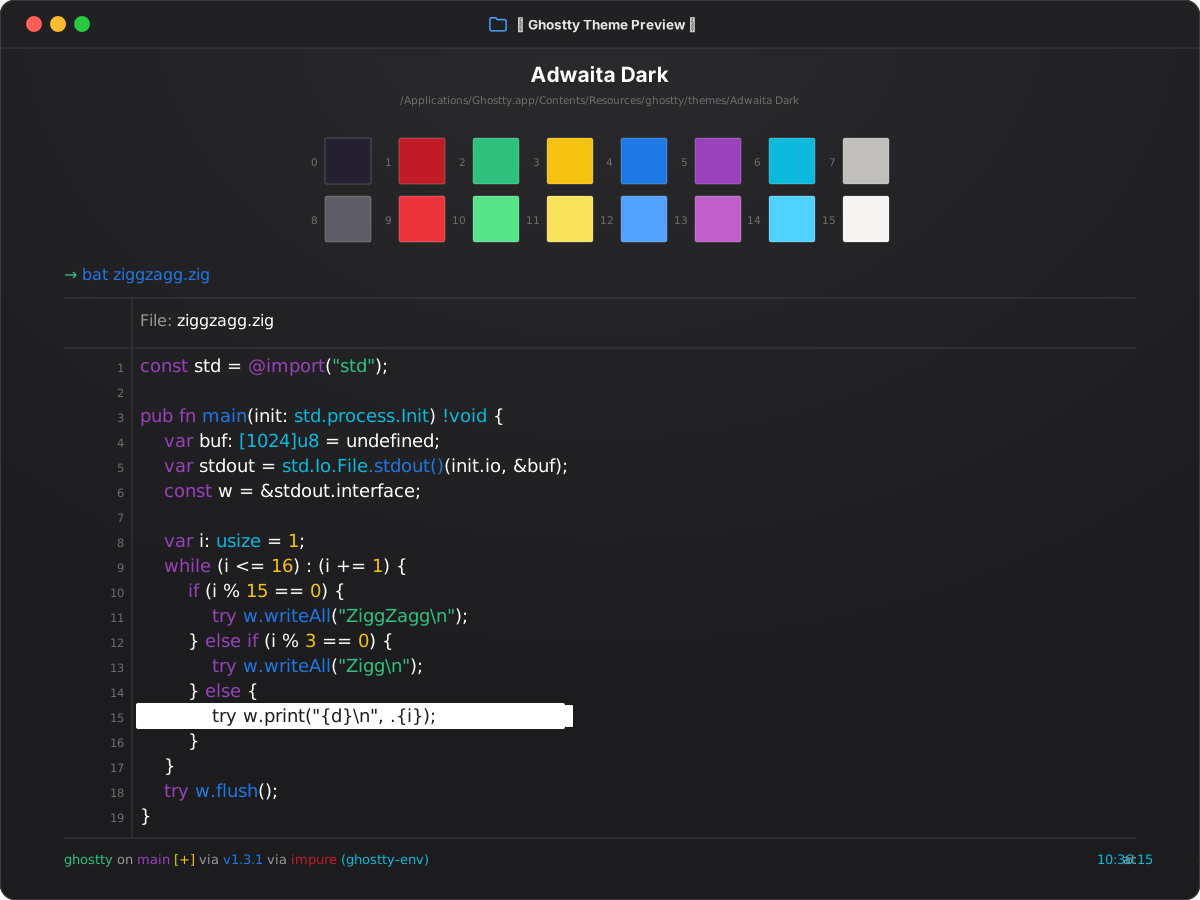
Install
Install in Ghostty
~/.config/ghostty/config.ghostty
theme = Adwaita Dark
Save the file, then reload with Cmd+Shift+, on macOS or Ctrl+Shift+, on Linux.
Colors
Palette
Every color from the bundled theme file.
ANSI palette
0
Black#241f31
1
Red#c01c28
2
Green#2ec27e
3
Yellow#f5c211
4
Blue#1e78e4
5
Magenta#9841bb
6
Cyan#0ab9dc
7
White#c0bfbc
8
Bright Black#5e5c64
9
Bright Red#ed333b
10
Bright Green#57e389
11
Bright Yellow#f8e45c
12
Bright Blue#51a1ff
13
Bright Magenta#c061cb
14
Bright Cyan#4fd2fd
15
Bright White#f6f5f4
Terminal UI
Background#1c1c1f
Foreground#ffffff
Cursor#ffffff
Cursor text#1c1c1f
Selection#ffffff
Selection text#1c1c1f