darkBuilt-in16 ANSI colors
Night Owl for Ghostty
Night Owl uses a very dark navy (#011627) instead of neutral gray, with a #d6deeb foreground and a violet cursor. The accents are bright without becoming neon, which is why the theme remains popular for late-night work. The light built-in is spelled Night Owlish Light.
Preview
Terminal preview
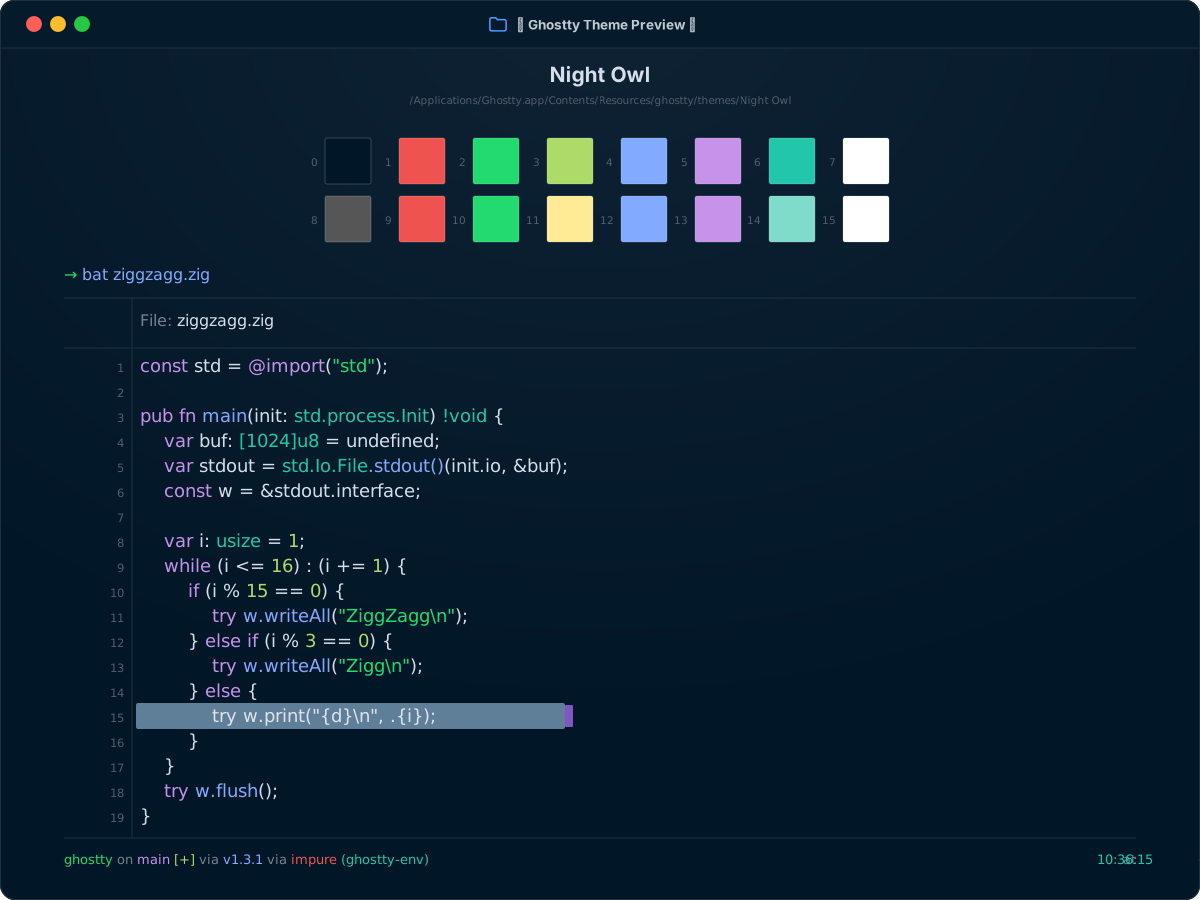
Install
Install in Ghostty
~/.config/ghostty/config.ghostty
theme = Night Owl
Save the file, then reload with Cmd+Shift+, on macOS or Ctrl+Shift+, on Linux.
Light / dark
Automatic appearance switching
Ghostty switches to Night Owl in dark mode and Night Owlish Light in light mode.
~/.config/ghostty/config.ghostty
theme = dark:Night Owl,light:Night Owlish Light
Colors
Palette
Every color from the bundled theme file.
ANSI palette
0
Black#011627
1
Red#ef5350
2
Green#22da6e
3
Yellow#addb67
4
Blue#82aaff
5
Magenta#c792ea
6
Cyan#21c7a8
7
White#ffffff
8
Bright Black#575656
9
Bright Red#ef5350
10
Bright Green#22da6e
11
Bright Yellow#ffeb95
12
Bright Blue#82aaff
13
Bright Magenta#c792ea
14
Bright Cyan#7fdbca
15
Bright White#ffffff
Terminal UI
Background#011627
Foreground#d6deeb
Cursor#7e57c2
Cursor text#ffffff
Selection#5f7e97
Selection text#dfe5ee